[Heart Forecast ③] The clapping motion in a maid outfit! A record of the weight of the fabric and fine-tuning.
Pochi
Reading in the sun and reading in the rain.
Heart Forecast Respect Animation Project 1!
The applause motion for the heart forecast is finally complete.
Last time, the hand movements felt completely off, like "something's different..."
However, after carefully observing the original short video frame by frame and making repeated revisions, I was finally able to get close to the "lightness of the original."
In this article, Why did it fail? What did I fix and how? What points did I focus on to make it closer to the original?This is explained in detail along with the actual correction process.
The animation movementThe article also explains "the reasons why it looks unnatural" and "tips for making subtle movements look natural."Therefore, this should be helpful for those who want to study the workings of emotional forecasting or those who want to improve their animation production skills.
So, let's start by reviewing our previous failures.
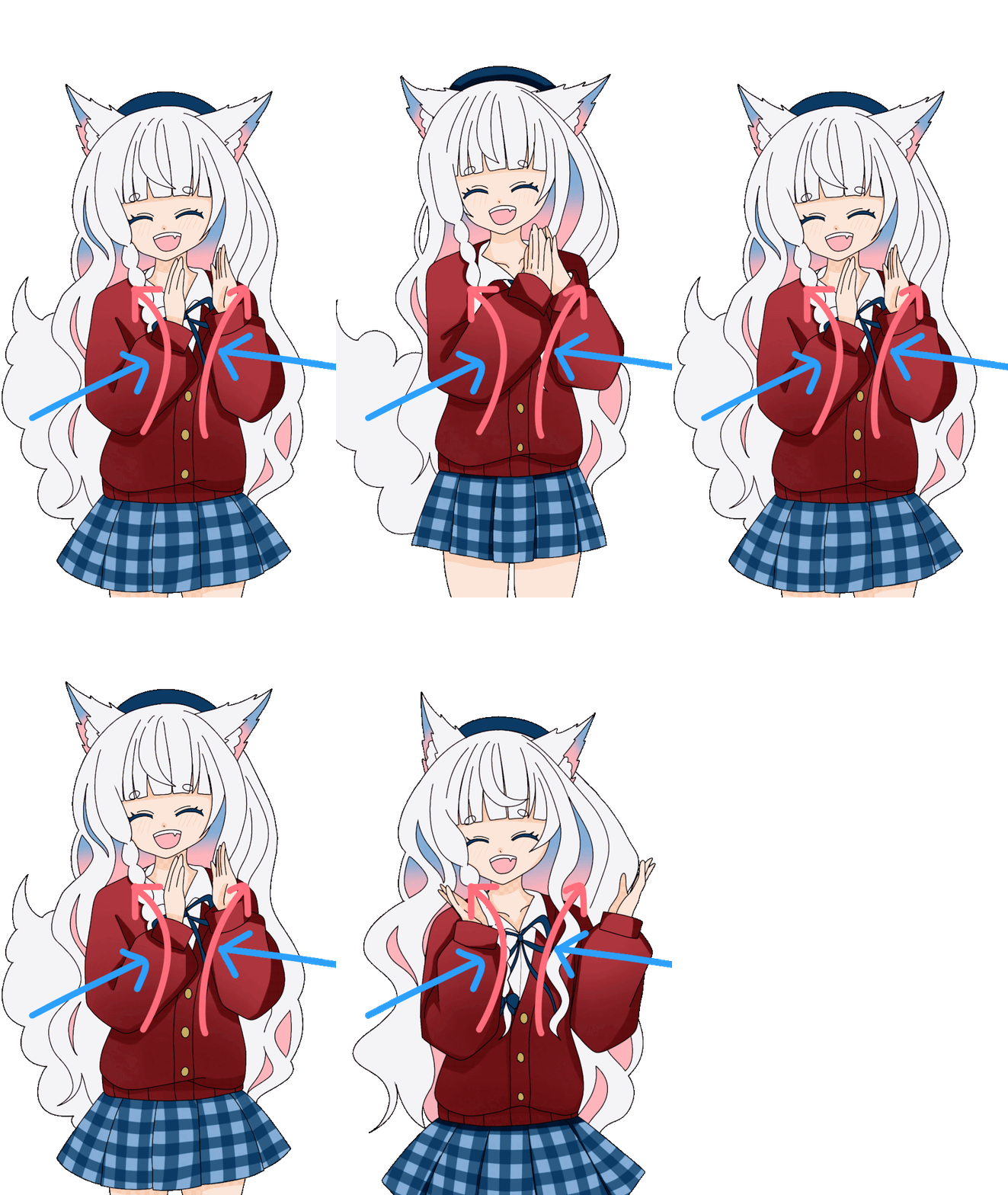
Here it is,The animation I felt was a "failure" this timeIs.
In the original video, the hands move in a soft, circular motion, as shown by the pink arrows.
On the other hand, my failed animation was,The trajectory is linear, as shown by the blue arrow, making the movement appear stiff.
Even though it's the same "clapping," just a difference in the trajectory can completely change the impression it gives.
The differences in movement compared to the original are immediately obvious.
So, from here on out...The process of making every effort to revise it to closely resemble the original's clapping motion.I will be discussing that.

In order to recreate the movements of the original, the first thing I reviewed was"Observation Method"That's it.
When I first started creating the animation, I was drawing while tracking short videos using my "dynamic visual acuity," but this made it impossible to accurately grasp the fine details of the trajectory and the timing of the shaking.
Therefore, this time,A method of checking the movement frame by frame and then applying it to your own character.I switched to this.
By using frame-by-frame playback,
This kind of“The basis for the movement”It will become clearly visible.
For detailed instructions on how to use frame-by-frame playback, please refer to the related articles.
 [Mind Forecast ①] Fixing awkwardness by frame-by-frame analysis of YouTube shorts! Summary of correction points to make clapping motions look more natural
From here, I will explain what modifications were actually made based on what was observed frame by frame.
We meticulously adjusted every detail that affects the character's naturalness, such as the swaying of the hair, the angle of the ears, the fluttering of the skirt, and the movement of the tail.
The original artist has short hair, so I was quite unsure how to make my super long hair move.
So, I started by imagining how the hair would move when she jumped, and then proceeded to draw.
We create the shaking while keeping these two points in mind.
(Perhaps I could have exaggerated it a little more.)
I wanted to create a cute look where the ears wiggle when it jumps.I adjusted the shape of the ear tips to create an arched shape while ensuring they didn't look distorted.
I'm quite satisfied with how well I drew this time.
However, the movement of bending the ears is still weak, so next time I'd like to focus on making the movement a little softer.
The skirt also...“Feeling weightless”I made sure that it would appear.
I wanted to create a soft, spreading effect, but it turned out more subtle than I expected, so next time I might try making it a bit more dramatic.
I tried to keep my elbows as still as possible and focus on moving only my fingertips.
This allows for adjustments to ensure that the clapping hands don't look unnatural even when jumping.
Ahoge (stray hair), the base of the skirt, ears, tail, etc.“The base of the part that sways”I paid particular attention to that when drawing it.
Clearly separating these two elements significantly changes the overall naturalness of the animation.
Since the base of the tail isn't visible, I focused more on depicting the movement of the base when drawing it.
Adding this recoil makes the tail wagging look more natural.
Each pattern on the skirt was created on a separate layer, and the distortion during jumps was carefully adjusted.
The sagging areas are designed to drape along with the check pattern, creating a textured look.
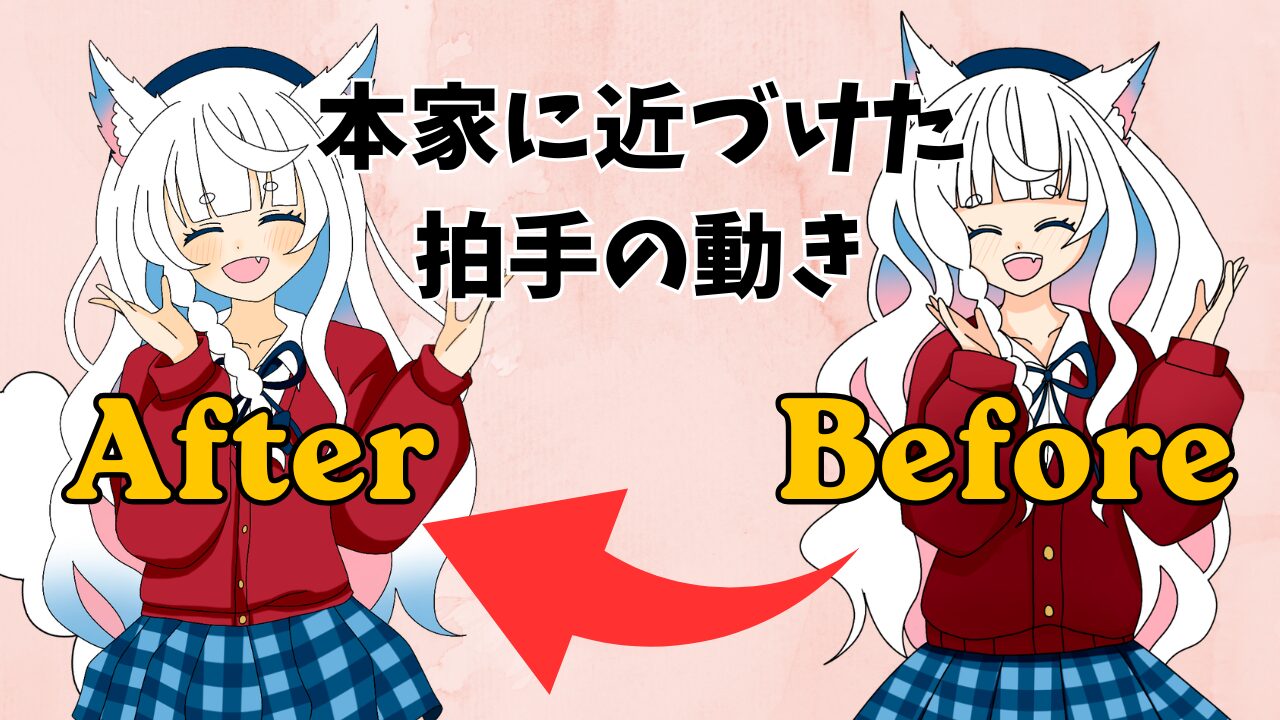
Based on the revisions made so far, let's compare how much it has actually changed.

When you compare the original and revised versions side-by-side, the difference is immediately obvious.
The overall impression changed dramatically as a result of paying attention to details such as the trajectory of the hands, the timing of the swaying, and the movement of the hair and skirt.
"I can't believe how much it's changed...!"I'm surprised myself at how much the naturalness of my movements has improved.
This time, by carefully observing the original creator's movements frame by frame during production, How to vary the speed and intensity, the starting point of the sway, the movement of the root, and how to create the trajectory.I was able to relearn important fundamental points of animation.
Animation is not something done "just because",Giving a reason to each movement creates a sense of naturalness.This revision made me realize this very strongly.
If you're interested in creating animation, please give it a try!
Even just observing it frame by frame can surprisingly deepen your understanding, so I highly recommend it.
This time too, my usual partner iPad Air × Procreate × Apple Pencil It was created using a combination of these elements.
The Apple Pencil makes it easy to draw even in small areas, and I feel it's a really good match for my drawing style.

・・・・・・・・・・・・・・・・・・・・・・・・
If you found this article helpful and would like to support it,
Receiving encouragement from OFUSE is very motivating.
Your support will be instrumental in creating illustrations and updating my blog.
Thank you very much for reading to the end.
Thanks to everyone who always reads my work, I can continue to create.
I look forward to your continued support.
This page summarizes tips for "frame-by-frame observation."
If you're looking to correct any awkwardness in your hand movements or subtle actions, this article might be helpful.
[Mind Forecast ①] Fixing awkwardness by frame-by-frame analysis of YouTube shorts! Summary of correction points to make clapping motions look more natural